

The DROP TABLE statement in PostgreSQL is used to permanently remove an existing table from the database.
- Removes the table structure, indexes, constraints and associated objects.
- Frees the storage space occupied by the table.
- Can remove one or multiple tables at the same time.
Syntax
DROP TABLE [IF EXISTS] table_name [CASCADE | RESTRICT];Where:
- table_name: The name of the table to be deleted.
- IF EXISTS (optional): Prevents an error if the table does not exist.
- CASCADE (optional): Automatically removes dependent objects such as foreign key constraints, views, etc.
- RESTRICT (optional): Prevents the table from being dropped if any dependent objects exist (default behavior).
Examples
Firstly, create an Employee table with the required columns.
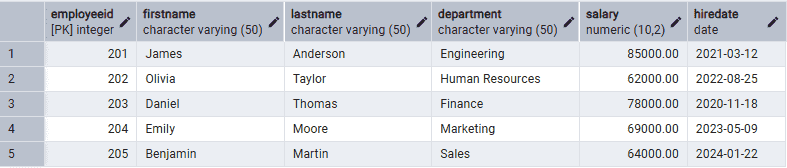
Example: Drop the Employee Table
The following query removes the Employee table from the database.
Query:
DROP TABLE Employee;- The Employee table is permanently deleted from the database.
Example: Drop a Table Only If It Exists
Using IF EXISTS avoids an error if the specified table is not present.
Query:
DROP TABLE IF EXISTS EmployeeBackup;Output:
NOTICE: table "employeebackup" does not exist, skippingDROP TABLE
Example: Drop Multiple Tables
PostgreSQL allows deleting multiple tables in a single statement.
Query:
DROP TABLE IF EXISTS EmployeeBackup, Employee;- Both EmployeeBackup and Employee tables are removed from the database.
Example: Drop a Table with CASCADE
If other database objects depend on a table, use the CASCADE option to remove the table and all dependent objects.
Query:
DROP TABLE Employee CASCADE;Troubleshooting DROP TABLE Issues
- Table does not exist: Use IF EXISTS to avoid errors.
- Dependent objects exist: Use CASCADE to remove dependent objects automatically or RESTRICT to prevent accidental deletion.
- Permission denied: Ensure you have ownership of the table or the required privileges.
- Data loss warning: DROP TABLE permanently deletes the table and all its data. Consider creating a backup before executing the command.
