

A subquery in PostgreSQL is a query nested inside another SQL query. It is used to perform complex filtering, comparisons and calculations by using the result of one query within another.
- Apply aggregate functions such as SUM(), COUNT(), AVG(), MIN() and MAX().
- Update or delete records using data from another table.
- Simplify complex SQL queries.
PostgreSQL Clauses That Support Subqueries
Subqueries can be used with the following clauses:
- SELECT: Returns calculated values or additional information using a subquery.
- FROM: Treats the subquery as a temporary table (derived table).
- WHERE: Filters rows based on the result returned by the subquery.
- HAVING: Filters grouped data using the result of a subquery.
- INSERT: Inserts data returned by a subquery into another table.
- UPDATE: Updates rows using values returned by a subquery.
- DELETE: Deletes rows based on the result returned by a subquery.
Types of PostgreSQL Subqueries
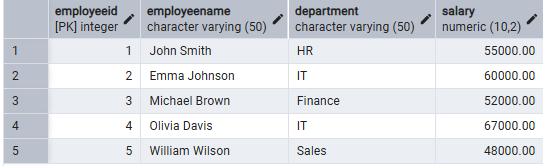
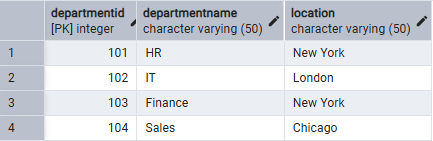
Consider the following tables.
Employees Table:
Department Table:
Single Row Query
A single-row subquery returns only one value.
- Returns exactly one row.
- Used with comparison operators such as =, >, <, >= and <=.
Example:
SELECT *
FROM Employees
WHERE Salary =
(
    SELECT MAX(Salary)
    FROM Employees
);
Output:

- The subquery finds the maximum salary.
- The outer query returns the employee with that salary.
Multi-Row Subquery
A multi-row subquery returns multiple rows.
- Returns more than one row.
- Used with operators such as IN, ANY and ALL.
Example
SELECT EmployeeName, Department
FROM Employees
WHERE Department IN
(
    SELECT DepartmentName
    FROM Departments
    WHERE Location = 'New York'
);
Output:
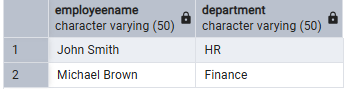
Explanation:
- The subquery finds departments located in New York.
- The outer query returns employees working in those departments.
Correlated Subquery
A correlated subquery depends on the outer query.
Features:
- References columns from the outer query.
- Executes once for every row processed by the outer query.
- Useful for row-by-row comparisons.
Example
SELECT e.EmployeeName,
       e.Department,
       e.Salary
FROM Employees e
WHERE e.Salary >
(
    SELECT AVG(Salary)
    FROM Employees
    WHERE Department = e.Department
);
Output:

- The subquery calculates the average salary for each department.
- The outer query returns employees earning more than their department's average salary.
Working
ExamplesExample: Subquery in WHERE Clause
SELECT EmployeeName, Salary
FROM Employees
WHERE Salary >
(
    SELECT AVG(Salary)
    FROM Employees
);
Output:
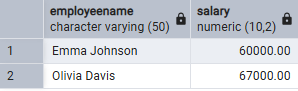
- Finds employees earning above the average salary.
Example: Subquery with UPDATE
UPDATE Employees
SET Salary = Salary + 5000
WHERE Department IN
(
    SELECT DepartmentName
    FROM Departments
    WHERE Location = 'New York'
);
Output:
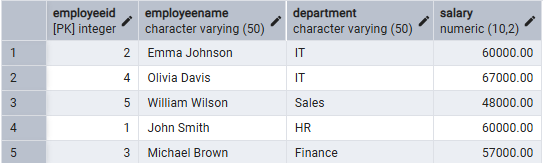
- Increases the salary of employees working in departments located in New York.
Example 3: Subquery with DELETE
DELETE FROM Employees
WHERE Department IN
(
    SELECT DepartmentName
    FROM Departments
    WHERE Location = 'Chicago'
);
Output:
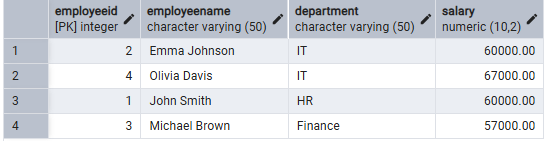
- Deletes employees working in departments located in Chicago.
Example: Subquery in FROM Clause
SELECT AVG(Salary) AS AverageSalary
FROM
(
    SELECT Salary
    FROM Employees
    WHERE Salary > 50000
) AS HighSalaryEmployees;
Output:
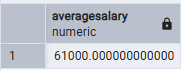
- The subquery creates a temporary table containing salaries greater than 50,000.
- The outer query calculates the average salary from that temporary table.
