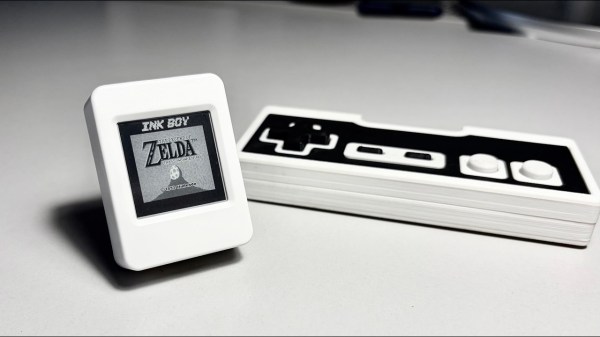
Tiny E-Paper Display Delivers 30 FPS Of Game Boy Fun

Slow refresh, ghosting and low-contrast — wait, are we talking about passive matrix LCDs, or e-paper displays? That might be why e-paper Game Boy emulators are a thing: the limitations of the black-on-grey e-paper screens remind us of the grey-on-green LCDs Nintendo used in the 80s. In this case [Bo Made It] made it out of a Waveshare ESP32-S3-ePaper-1.54, and got 30 FPS from it. 

Now, regular readers might be thinking, “So, we’ve seen the 60 FPS e-paper monitor, how is this special?” It’s a fair question. The answer is that [Bo] is doing this on a randomly chosen dev board with a built in wavetable e-paper controller, rather than the bare inputs that allowed the [Wenting Zhang]’s project to work. On the other hand, [Bo] does credit [Wenting], particularly his e-ink PaperBoy project, with directly inspiring both the project and his implementation.

Again, the big difference is going through the blob of the controller, but it turns out you can still address individual pixels through it. [Bo] gave each pixel a ‘budget’ for up to 8 pulses it depending on how much it needs to change, speeding things up immensely. Our favorite part is how he achieves the Game Boy’s 4-bit greyscale by, in effect, deliberately ghosting the display. Pixels aren’t driven long enough to fully flip them if they’re going only one shade lighter or darker. This complicated matters, since going from black to ‘white’ now takes longer than ‘white’ to the next darker grey, and the exact timing needs to be worked out for each color transition. Getting that timing right took a lot of calibration, and we like how he used video to help automate the process.

That process is still ongoing, so there’s no GitHub link yet. [Bo] will open source everything when it’s ready, and we look forward to it. We also look forward to the PDA-like device he’s going to be using this display driver for. If this all sounds similar to a recent 20 FPS e-paper hack, that’s because it’s the same underlying technology.

Continue reading “Tiny E-Paper Display Delivers 30 FPS Of Game Boy Fun” →
2026 Retrocomputing Challenge: USBSID-Pico Has Two SIDs, Many Inputs

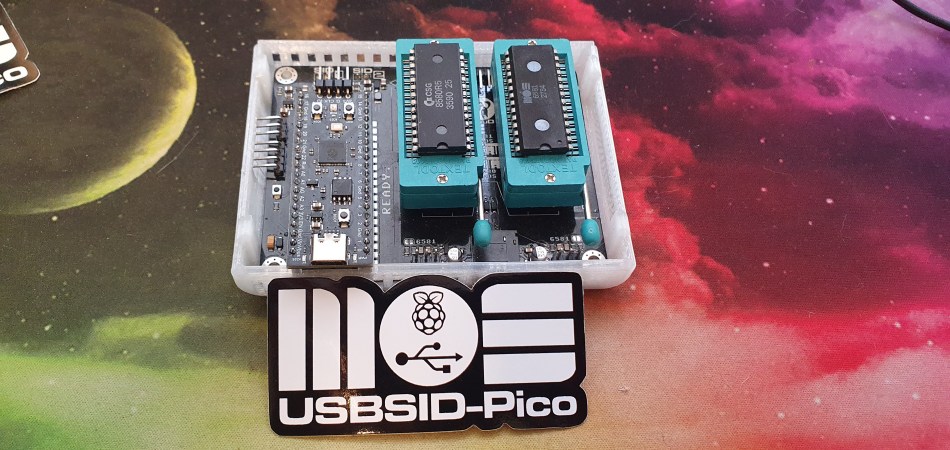
We’ll give you three guesses what the most important bits of silicon in [LouD]’s USBSID-Pico are, and two don’t count. Yes, there’s a Raspberry Pi Pico, and a pair of the unforgettable SID chips from MOS– the sound chip of the C64, the die that launched a thousand chiptunes. Well, unless you build it with a hardware SID replacement, but the goal of this device is to get SIDs hooked up to modern hardware.

To that end, USBSID-Pico can be controlled via USB– obviously– in the form of CDC/WebUSB/WebSerial but also MIDI, and even ASID, which is a specific protocol for streaming SID register data over MIDI. You might be wondering the point, since surely you can get cycle-accurate SID emulation on an RP2040, right? Well, not everyone agrees that cycle-accurate emulation is accurate enough; like the people who swear by the subtle distortions tube amplifiers introduce into the sound, some say the chip’s own inaccuracies give the sound out of the physical device a unique vibe emulators don’t match. That’s a fight for others to litigate; we just appreciate the work that went into getting these old sound chips talking to modern hardware, and getting the project certified as Open Source Hardware.

This combination of old sound and new microcontroller makes the USBSID-Pico a good entry for our ongoing retrocomputing contest, particularly the retro-modern category. Just be aware of PAL and NTSC differences with these old chips, or your beeps and boops might be out of tune. They haven’t made them in decades, but there are more than a few modern replacements for the MOS 6581.

The Hexa-Bouncer May Be The Most Overengineered Thing You See This Week

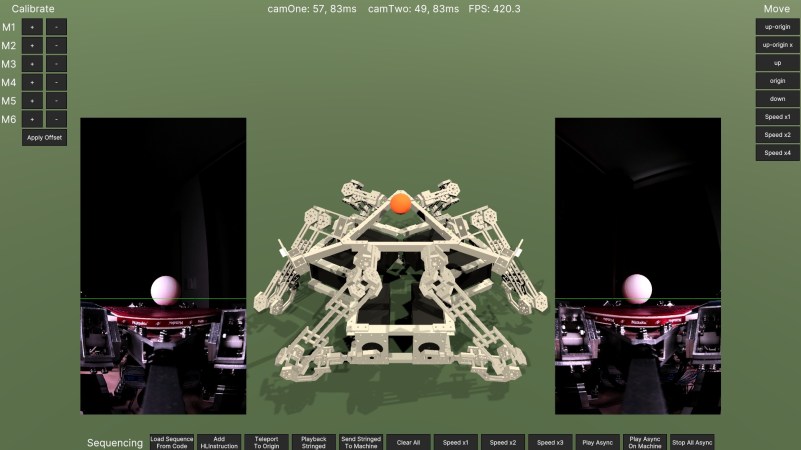
Sometimes, you want to build a simple project– the minimum viable product that solves your problem and nothing else. Other times you might be feeling a little extra, and want to use oodles of machined aluminum, six steppers, two cameras, a Teensy and a PC with a GPU just to bounce a ball. That’s the mood behind [T-Kuhn]’s hexa-bouncer, a Stewart Platform on steroids.  You can read all about it on his blog or witness it in action in the video below.  Trust us, really have to see it in action.

Continue reading “The Hexa-Bouncer May Be The Most Overengineered Thing You See This Week” →

AVIDdrone's winning entry: a helicopter.

DARPA Lift Challenge Won By Helicopter

America’s mad scientists all have one dream: DARPA money. DARPA, the Defense Advanced Research Projects Agency, regularly throws round sweet, sweet tax dollars to push the envelope on any number of things, leading to such spinoffs as the very network carrying these words to you. Not every DARPA project ends in revolution though– like the latest DARPA Lift Challenge, whose goal was to see the creation of a vehicle that could perform Vertical Take Off And Landing with a payload 4x its own weight. We’ve embedded the ‘look back’ video below.

We hoped for something revolutionary, something bizzare, something really, really cool– and there were absolutely entries on the field that met all of those superlatives. Unfortunately, sometimes conventional designs are the convention for a reason , and the overall winner by AVIDrone, Inc. was just a very well made electric helicopter. One big lift rotor, one little tail rotor– aside from clever details in the solid-state batteries and carbon-fiber construction, it is a totally normal aircraft… albeit one that could lift 3.84x its dry weight, or 112 lb of payload. Interestingly a battery-powered hexrotor drone took home second place with a 3.64:1 lift ratio. Perhaps the big shock was not seeing combustion engines until third place: another helicopter, this time with a turbine engine. So much for energy density!

Some of the other more bizzare– if less performant–entries did get prizes to further their development, so we’ll likely see them back for the 2028 version of the challenge. Some of the concepts visible were covered here on Hackaday, like turning the drone body into a giant lift rotor , so perhaps one of you will have the bright idea that brings home a million in the next round of the contest.

Continue reading “DARPA Lift Challenge Won By Helicopter” →

Backup Tapes Come Back To The Homelab

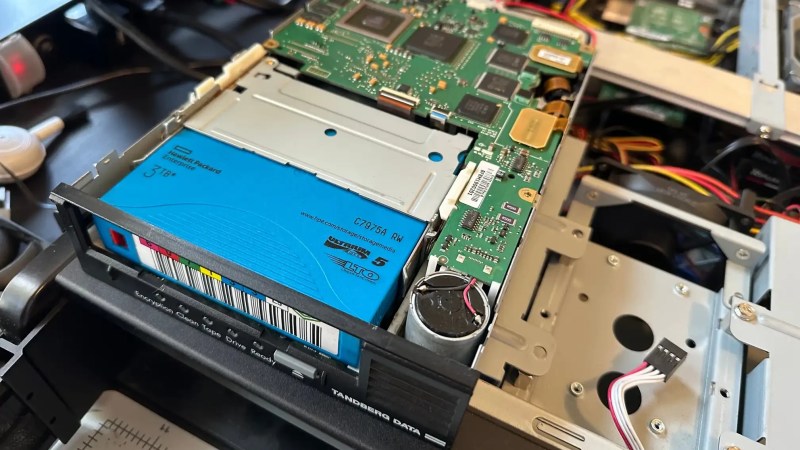
It’s one of the great mysteries of computing, how somehow in the Year Of OLlama 2026, tape remains the god of cheap storage. A while back [Ben Pettis] recounted his experience setting up an LTO-5 tape drive in his homelab, an experience which only becomes more relevant as hard drive prices stay high.

LTO-5 is already well out of date in the professional world, after all– a new server install would be debating the merits of LTO-9 versus LTO-10, but for the homelab it’s a matter of what’s affordable on the used market with decently-sized cartridges. If you can live with 1.5 TB of uncompressed data on a roughly palm-sized Linear Tape, Open cartridge then LTO-5 could be good enough. Yes, the tapes are advertized as 3TB, but that’s assuming a 2:1 compression ratio on the data, which you’re not likely to get on the photos and video that make up much of a data horder’s storage. That’s one thing [Ben] was quick to clear up for us. He also detailed his adventures with the cheaper-to-buy fiber channel model of drive.

The label would have you believe this box stores 30 TB.

Tape drives usually come with an SAS or fiber channel interface– fiber channel being, you guessed it, an optical solution unlike the SCSI-like SAS connection you may be familiar with for block storage devices. With a PCIe adapter it’s not hard to set up, provided you get the cables the right way around! That’s another detail we’re glad [Ben] shared so we can find it again if we have the same problem: with no switch in the circuit, you need a crossover cable to bring TX to RX. Which is obvious in retrospect, but obscure to those of us just learning about the standard.

The advantage, as [Ben] makes clear and everyone has always known is simply price. As of this writing, diskprices.com has 16$/TB as the lowest cost, while [Ben] was able to pick up lightly-used tapes on eBay for only 2$/TB. If you have a lot of data, those savings amortize the drive costs relatively quickly, since a used drive like [Ben]’s can be had for a few hundred bucks.

Is it the ultimate solution for our data storage woes? That depends on your needs, but perhaps not considering we get as many tips on storing data on reel-to-reel as we do on LTO. We even saw a tape-loading robot repurposed to serve bar one time.

DECing Out The Homelab With An AlphaServer 2100

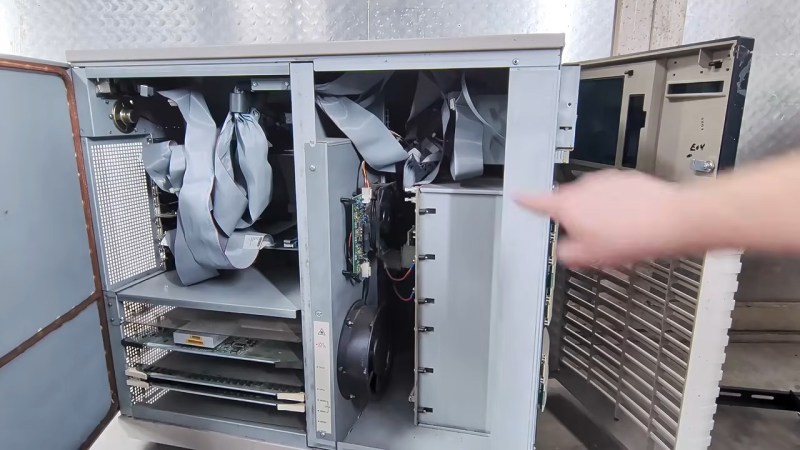
Retrocomputer enthusiasts have a bad rap as nerds who just want to play old video games. There’s some truth in this, but the reality is that we’re nerds who want to do all sorts of things with old hardware — everything from consoles to servers. Servers like the DEC AlphaServer 2100 [derelictelectronics] picked up at Vintage Computer Festival Midwest this year. He was kind enough to record a tour for those of us who missed seeing these early Alpha machines in their heyday.

DEC did sell these units with multiple-CPU reports from the get-go, but the [derelictronics] particular model has  a single CPU board carrying a 64-bit Alpha RISC processor. This machine from 1994 dates to near the height of the RISC wars when it seemed everyone needed to have their own high-end architecture, all of them RISC. While the machine could host up to 2GB of RAM, the example [derelictelectronics] found only has 256 MB, which was still not a small number for 1994!

Continue reading “DECing Out The Homelab With An AlphaServer 2100” →

2026 Retrocomputing Challenge: NEC 286 Laptop Rides Again

The sad reality is that all consumer electronics are going to be e-waste eventually. [Cory Whitesell] was determined his old NEC ProSpeed 286 Laptop wouldn’t meet that fate until absolutely necessary, so when his attempts at repairs failed, his efforts pivoted to create a retro battlestation from the stylish old machine.

That screen looks too good to be stock, but otherwise you can’t tell from this angle.

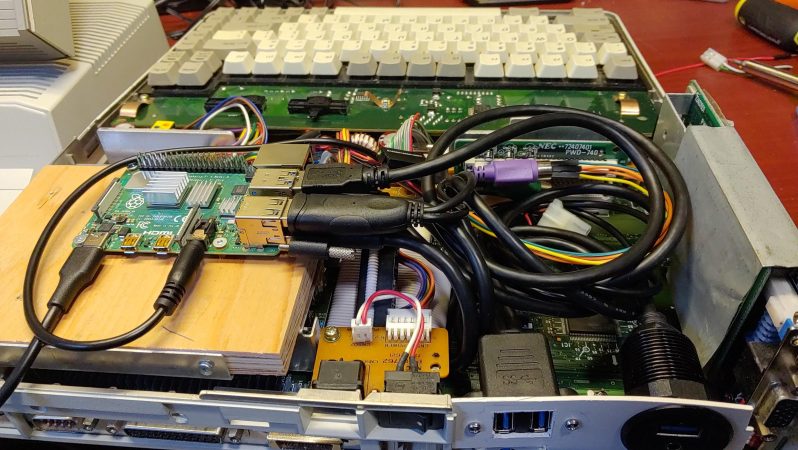
Externally, it looks pretty well stock, and [Cory] has retained as much of the internals as possible. The original power supply remains intact, with power taken off the original HDD’s molex connector. Said power drives a Raspberry Pi, which is small enough to fit inside without any gutting. The original keyboard connects easily enough via a PS/2 to USB adapter, while the passive-matrix LCD has been replaced with a modern screen of the same dimensions. You’d have to be a pretty hard-core purist to mourn that last change.

With emulation on the Pi, he can still have the DOS experience you’d expect from this machine, but its also powerful enough to be useful in the modern day. While we place no bets on whether or not this mod will stay relevant for another 38 years, a more powerful single-board computer or slightly-squished cell phone can be placed in the drive bay instead once the Pi’s ARM processor inevitably starts to look as anemic as the 286 does now.

Not everyone loves this kind of restomod, but we’ve featured more than a few and have a special category for it in our ongoing retrocomputing contest for those who will do everything to keep classics out of the e-waste bin, including remaking them.